iCompaas Inc changelog
www.icompaas.com

Personnel Integration


New


Seamless integration of your workforce for compliance management.

Personnel Integration connects your organization’s user directories from platforms like Office 365, Google Workspace, and Zoho, bringing all employee data into iCompaas for streamlined compliance tracking and accountability.

What you can see:

  • Integration with Office 365, Google Workspace, and Zoho
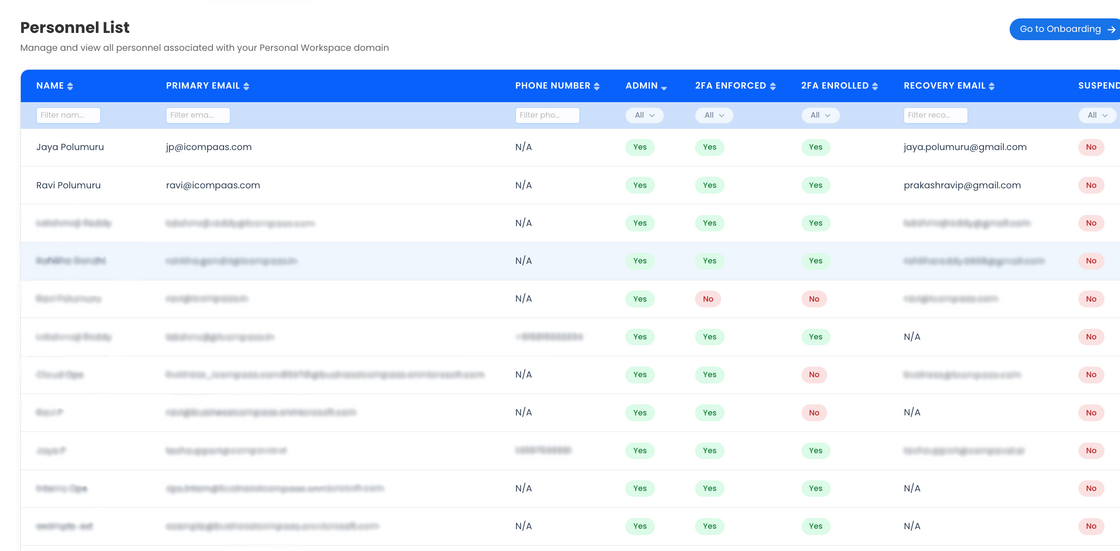
  • Centralized view of all employee details in one place
  • Visibility into MFA status, including whether it is enforced and enabled
  • Automatic syncing of employee data and user updates
  • Mapping of users to compliance controls and responsibilities

Personnel Integration replaces manual user tracking with automated visibility and control, helping ensure accurate records, improved security posture, and audit readiness.


Personnel Onboarding dashboard:
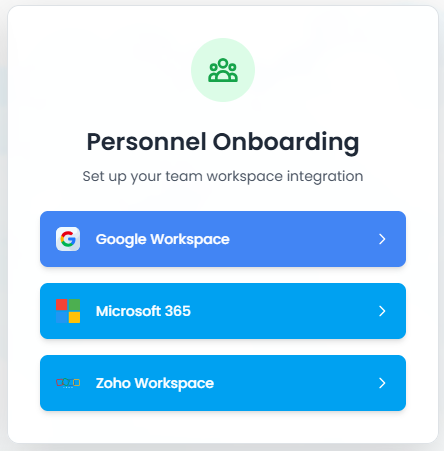
image.png


User details with MFA status visibility:
Screenshot 2026-02-27 at 6.36.55 PM (1).png


Cloud Compliance


New


Expanded cloud compliance across major platforms.

iCompaas now along with AWS supports integrations with Microsoft Azure and Google Cloud Platform (GCP), enabling continuous monitoring of cloud environments against compliance requirements.

What you can see:

  • Integration with Azure and GCP environments
  • Mapping of cloud configurations to compliance controls
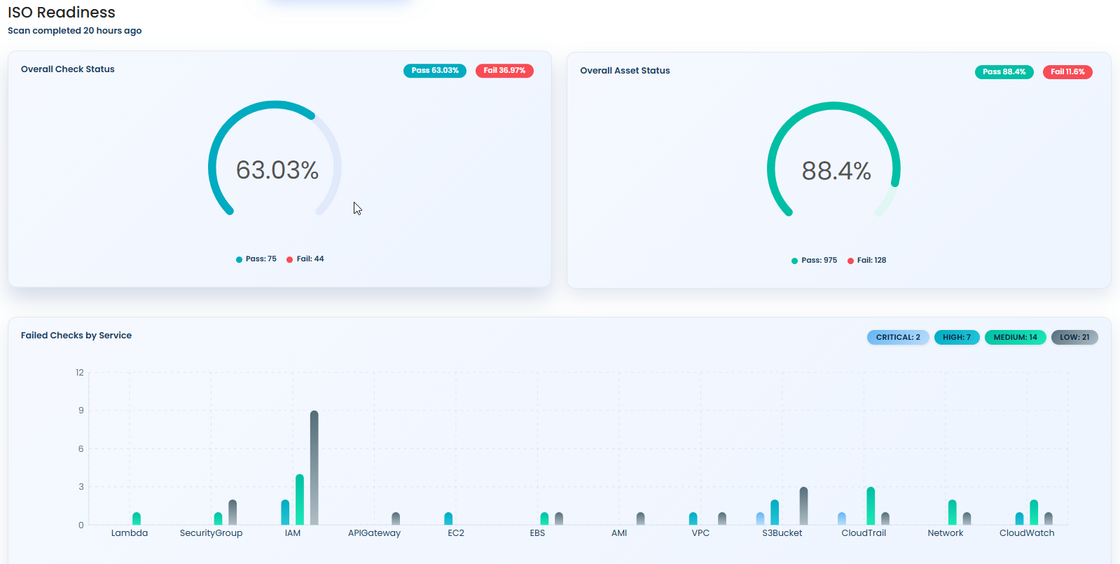
  • Continuous monitoring of cloud compliance posture
  • Identification of misconfigurations and gaps
  • Multi-cloud alignment with certification requirements

Cloud Compliance replaces manual cloud reviews with continuous, automated monitoring aligned to compliance standards.


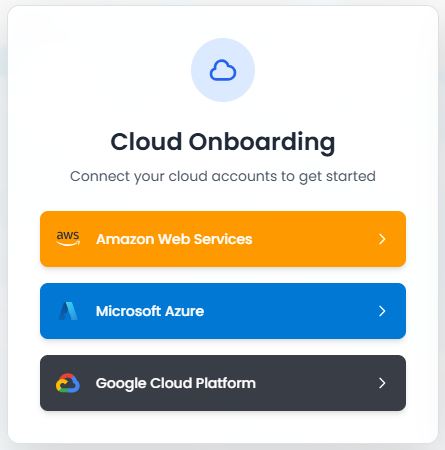
Cloud integration setup view:

image.png


Cloud compliance monitoring dashboard:

image.png


Compliance Hub


New


A centralized portal for managing employee acknowledgements.

Compliance Hub provides a single place where employees can review and acknowledge key compliance documents such as Code of Conduct, Security Awareness, and Information Security policies. It simplifies how acknowledgements are collected, tracked, and maintained across the organization.

What you can see:

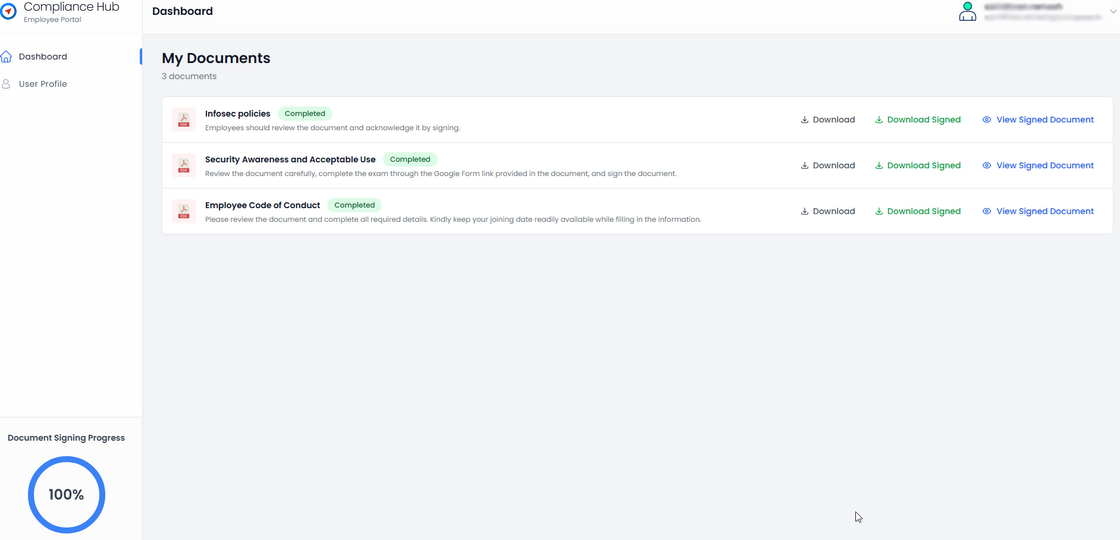
  • Access to all compliance documents in one place
  • Employee acknowledgements with date tracking
  • Digital signature using auto-generated signature mechanism
  • Visibility into acknowledgement status across employees
  • Centralized tracking of completed and pending acknowledgements

Compliance Hub replaces manual follow-ups and scattered records with a streamlined, trackable system, making the entire compliance process easier, faster, and more reliable.


Centralized portal with compliance documents:

cb (1).png


Milestone Journey


New


A clear, real-time view of your certification journey.

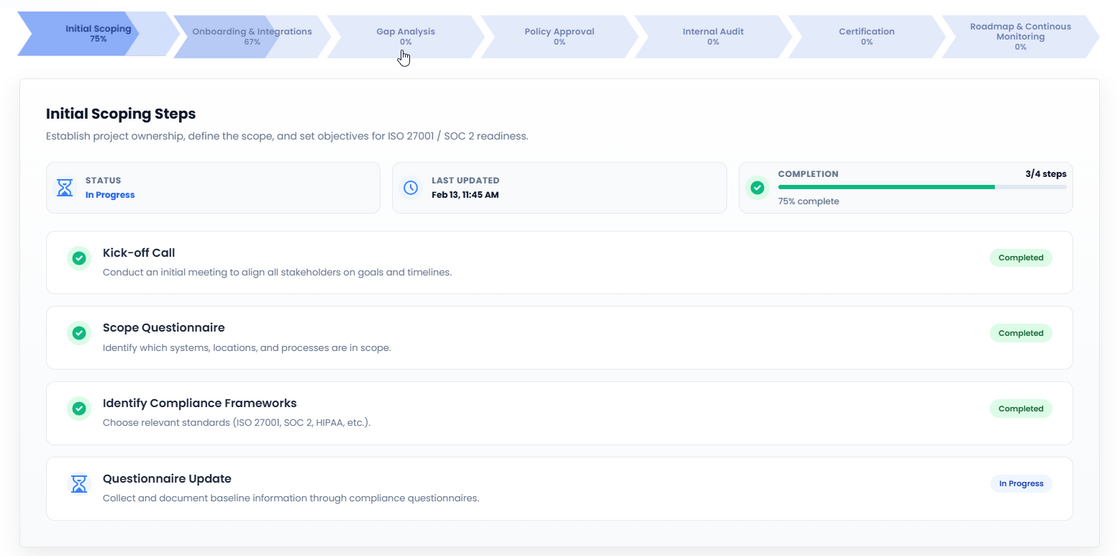
Milestone Journey shows how your certification progresses from onboarding through certification, broken into clear, well-defined phases. At any point, you can see where things stand and what comes next — without manual tracking or status calls.

What you can see:

  • End-to-end certification journey in one view
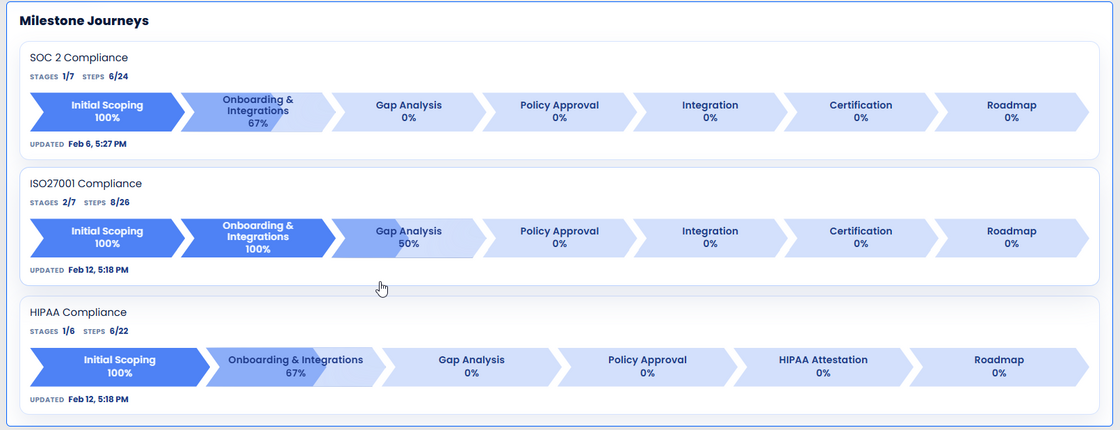
  • Clearly defined phases (scoping, gap analysis, implementation, evidence, audit readiness)
  • Real-time status for each phase (completed, in progress, upcoming)
  • A single view of overall certification health

Milestone Journey replaces spreadsheets and fragmented updates with a single, reliable source of truth for certification progress.


Certification overview showing milestone status:

image.png


Detailed stage view with phase-level progress:

image.png

Auditor Management


New


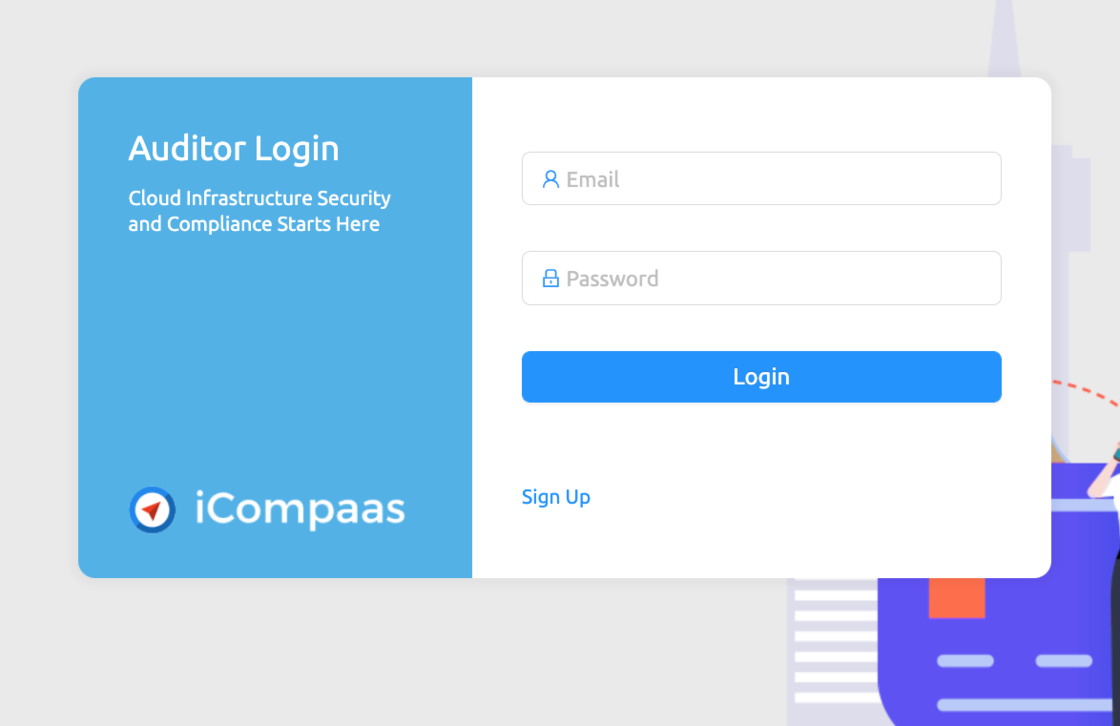
A complete workflow dedicated to make Auditor and clients life easy. The Auditor login (https://app.icompaas.com/auditor) helps Auditors to review and approve processes and procedures. The client shares secure access to the auditor and can check and see if the documents are approved or give clarifications. This workflow enables efficient coordination and secures sensitive email trails.

Screen Shot 2022-05-10 at 10.26.55 AM.png

iCompaas New Feature - Device Management


New


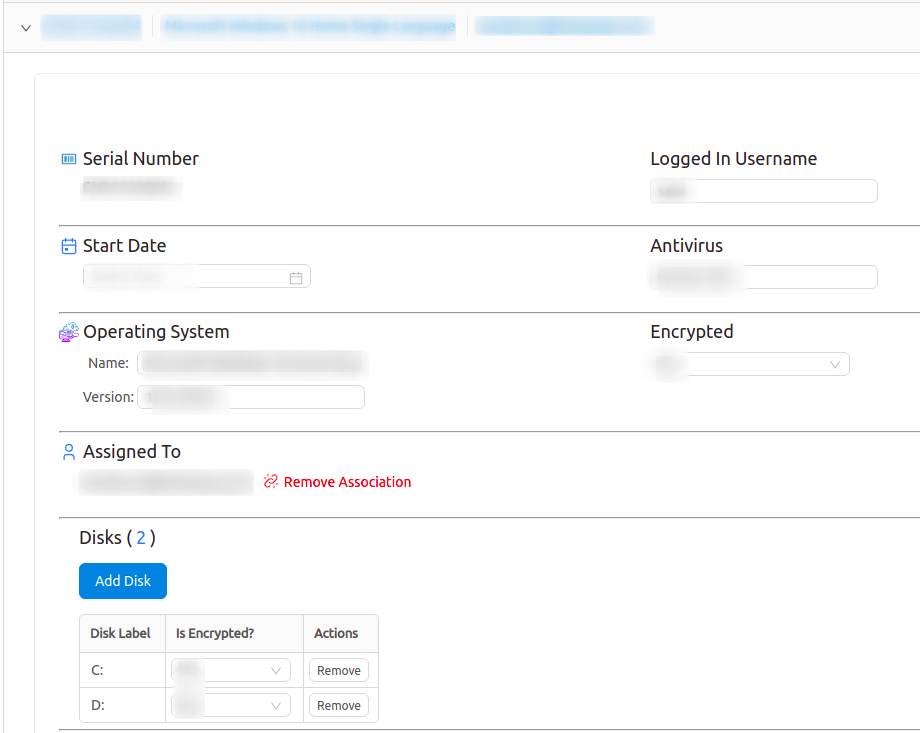
Device Management feature helps in Managing and maintaining devices in a customer/employee/client environment. It is used for the upkeep and maintenance of devices shared by employer, or employee popularly bring your own devices(BYOD).

We can view and confirm the hardware serial number of the device, user info, latest patch for the OS and antivirus presence. The feature also helps to gather info on encryption of hard disk that is imperative if you have client information. By following simple instructions, the end users can install and configure as a one time activity, after which the data can be gathered by employee as and when required.

It makes it simple to securely register, monitor, organize, and remotely assess system security levels and related software versions. Benefits include quick device registration, and frequent updates when there is a change in the system.

image (1).png

image (3).png

iCompaas Feature - Adding Sub-users/Team


New


Add your Operations Team members to see alerts and notifications that are important to your cloud environment.

All users added to teams will get alerts as part of the overall monitoring of all the compliance specific features and the different AWS environments that the account is added to. You will have the ability to add/revoke and resend invites to different users.

Note: One email ID can have only access to one iCompaas account.

image (2).png

Compliance Questionnaire


New


The Compliance Questionnaire feature rolled out in March 2021, acts as a repository for information on infrastructure, software, people, processes, and data that will be evaluated during the SOC 2 and other compliance audits.

Our comprehensive Questionnaire covers a vast range of topics from the most general information to really specific access controls, data encryption at rest and data handling in transit, etc.

The answers are used for automating the process of policy creation for compliance readiness, so no re-entry of data is required and a centralized place to modify key data and process.

image.png

Partner White-label Support


New


iCompaas enables the white-labeling of our products for Partners who are in the Managed Security Service Provider(MSSP) program. Partners can log in to their customized site at https://app.icompaas.com/partnersignin and experience white-labeling of their dashboard, reports, and notifications.

image.png

AWS Well-Architected Framework - New Feature


Improvement


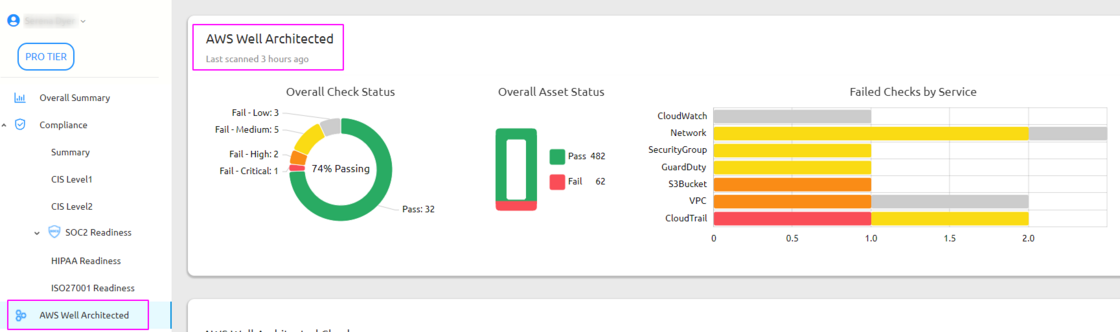
AWS Well-Architected Framework helps cloud architects build secure, high-performing, resilient, and efficient infrastructure for their applications and workloads. It provides a consistent approach for customers and partners to evaluate architectures, and implement designs that can scale over time. iCompaas maps the Client’s architecture to the technical asks of the five pillars of operational excellence, security, reliability, performance efficiency, and cost optimization.

image.png